Lecture Slides to Study Notes and Practice Questions
Short answer: Save your deck as a .pptx file, create a note from it, check the note against your slides, then quiz yourself on it. Nuros reads the text on each slide, tables, grouped text boxes, speaker notes and slides that are only a picture. ARC then brings back the concepts you miss for review.
Lecture slides are written to be presented, not studied. The bullets make sense while your teacher is talking and much less the night before a test. This guide shows how to turn a slide deck into notes you can learn from and practice questions you can test yourself with. Every screenshot below comes from a real run with a sample lecture deck.
What you need
- The slide file. Nuros reads PowerPoint files (.pptx).
- Google Slides: File > Download > Microsoft PowerPoint (.pptx).
- Keynote: File > Export To > PowerPoint.
- Older .ppt files: open them and save as .pptx first.
- A PDF export of your slides also works, but a PDF usually leaves out speaker notes.
- Size limits: up to 10 files in one note, 50 MB per file.
Step 1: Create a note from your slides
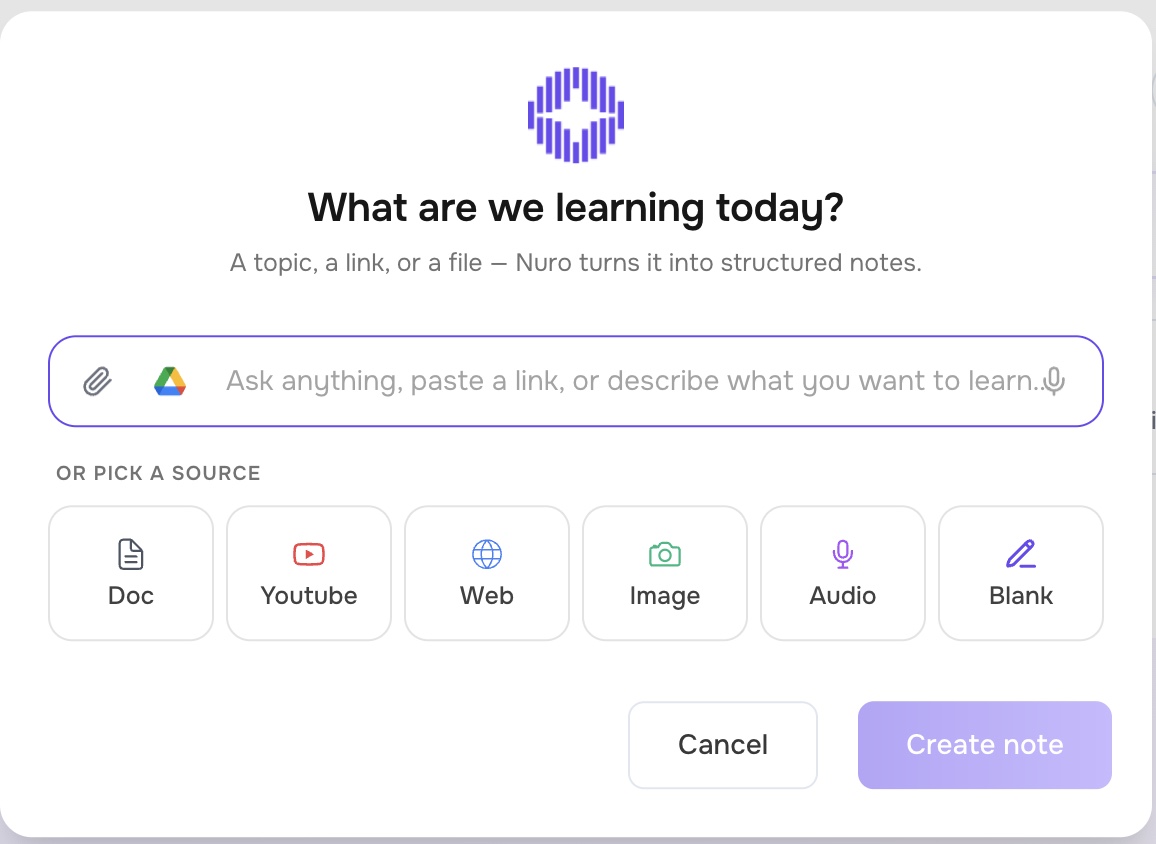
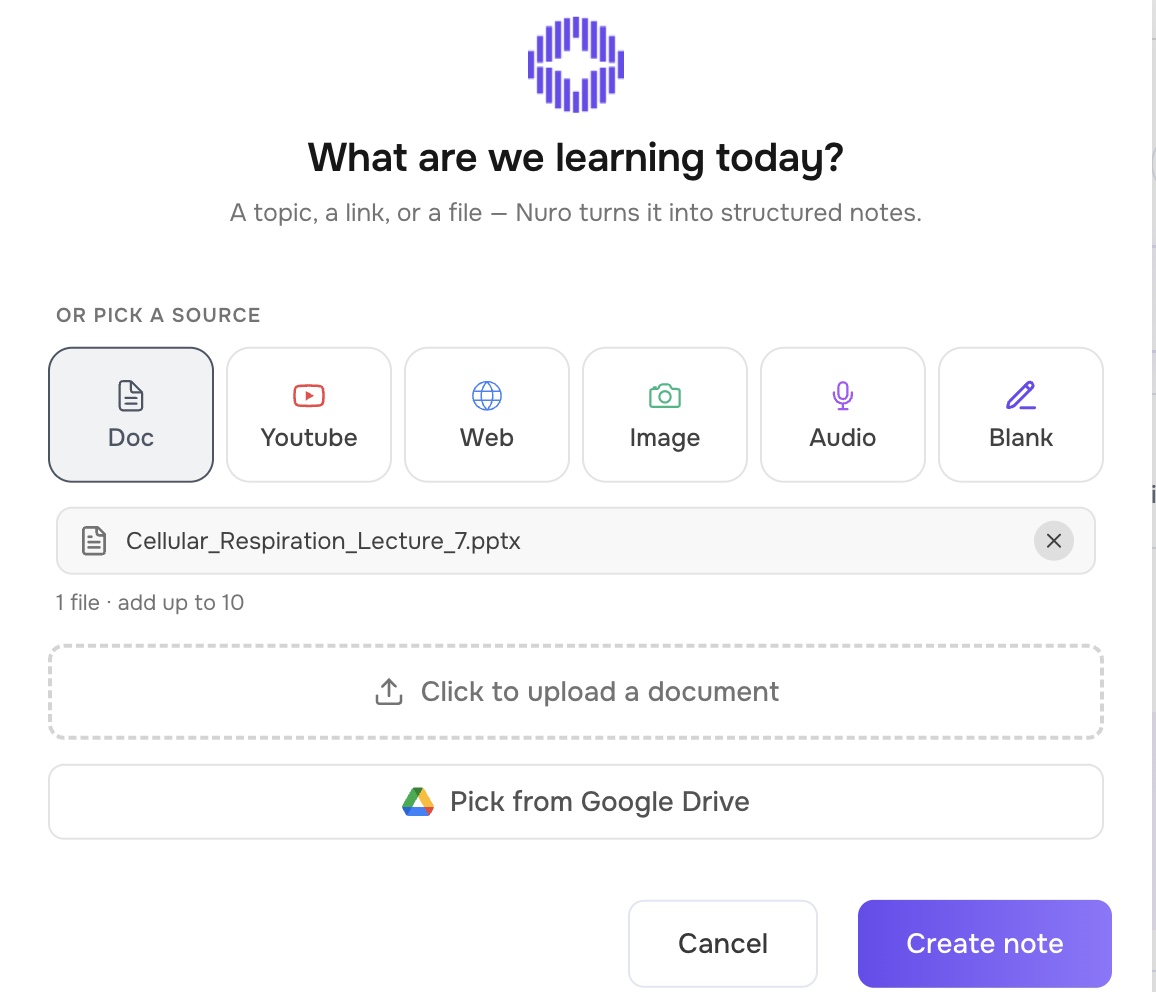
- In Nuros, select New note. You'll see "What are we learning today?"
- Choose Doc (or the paperclip) and upload your .pptx file, or use Pick from Google Drive.
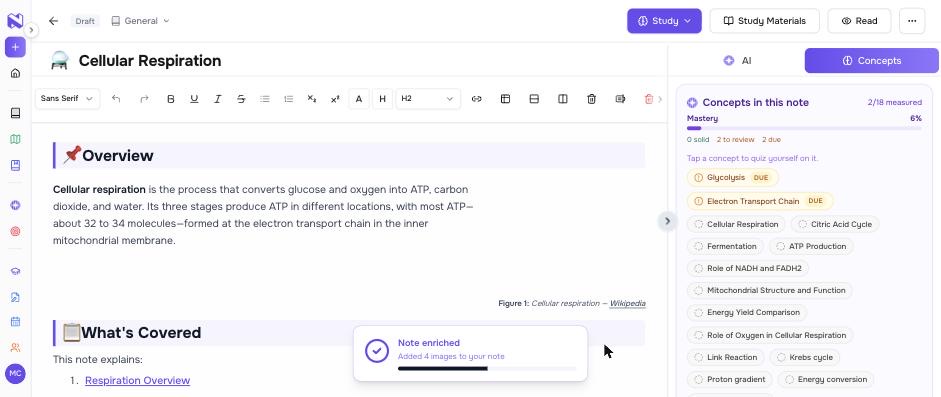
- Select Create note. The first sections appear within seconds; the full note, including images, takes a few minutes.
If your teacher split a unit across several decks, add them to the same note so it covers the whole unit.
Step 2: Know what Nuros reads from a deck
Nuros reads:
- Text on each slide, including titles and bullet points.
- Tables, row by row.
- Text inside grouped shapes, such as diagrams built from text boxes.
- Speaker notes, which is often where the real explanation lives.
- Slides that are only a picture, such as a diagram or a photo of a whiteboard, using image recognition. Up to 25 of these per deck.
What to know:
- Pictures on slides that already have plenty of text are not read separately. If a slide has a paragraph and a diagram, the diagram's labels may not make it into the note. Add a one-line caption in the speaker notes if it matters.
- Videos, audio and animations inside slides are not read. If the lecture was recorded, add the recording as its own source.
- Handwriting and low-resolution images can be misread. Check those parts of the note.
Step 3: Check the note against your slides
AI notes should be checked, especially before a test. Take five minutes:
- Scan the headings. Each main topic from the deck should have its own section.
- Spot-check numbers and definitions against the slides. These are the details that matter on exams.
- Look for what your teacher stressed out loud. If it isn't on the slides, add it to the note yourself.
Every note ends with a Sources section, and the Concepts panel beside the note lists the concepts Nuros found in your slides, so a missing topic is easy to spot.
Step 4: Turn the note into practice
From the note, open Study Materials and select Create to make:
- Flashcards for definitions, terms and steps in a process.
- A quiz to test yourself on the key ideas. You choose how many questions (up to 25) and which types: true/false, multiple choice, matching or written.
- A practice exam when the test is close.
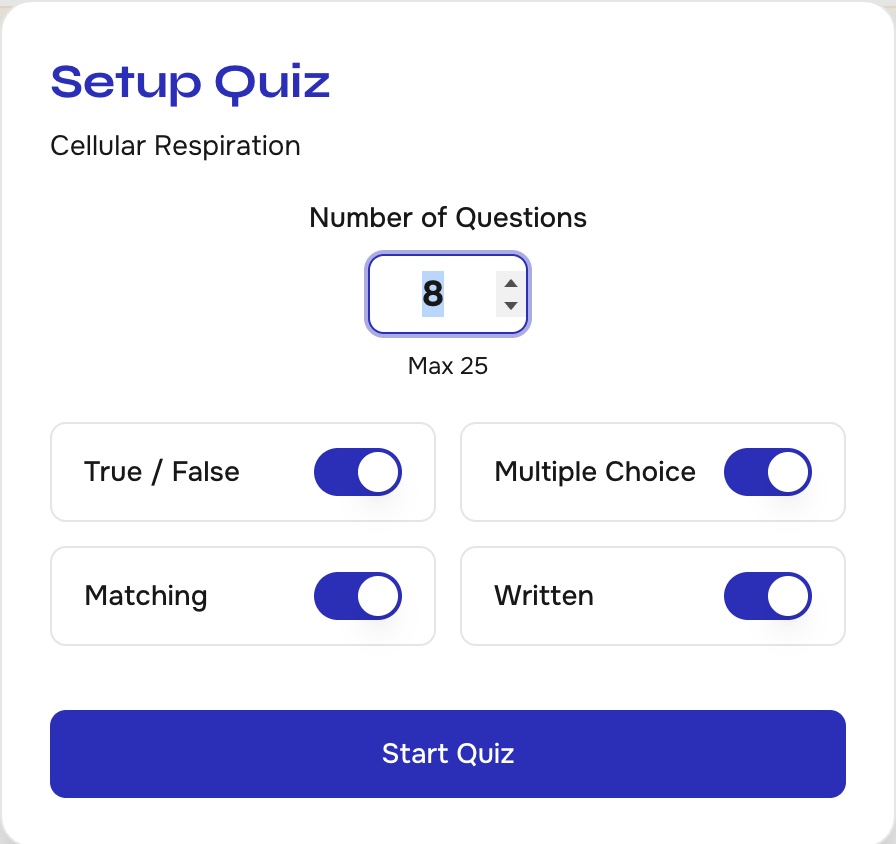
Answer honestly and don't skip the questions you're unsure about. Your mistakes are what Nuros uses next.
Step 5: Review what you missed
Every quiz, flashcard set and exam updates how well you know each concept. Nuros ARC uses that to decide what you review and when:
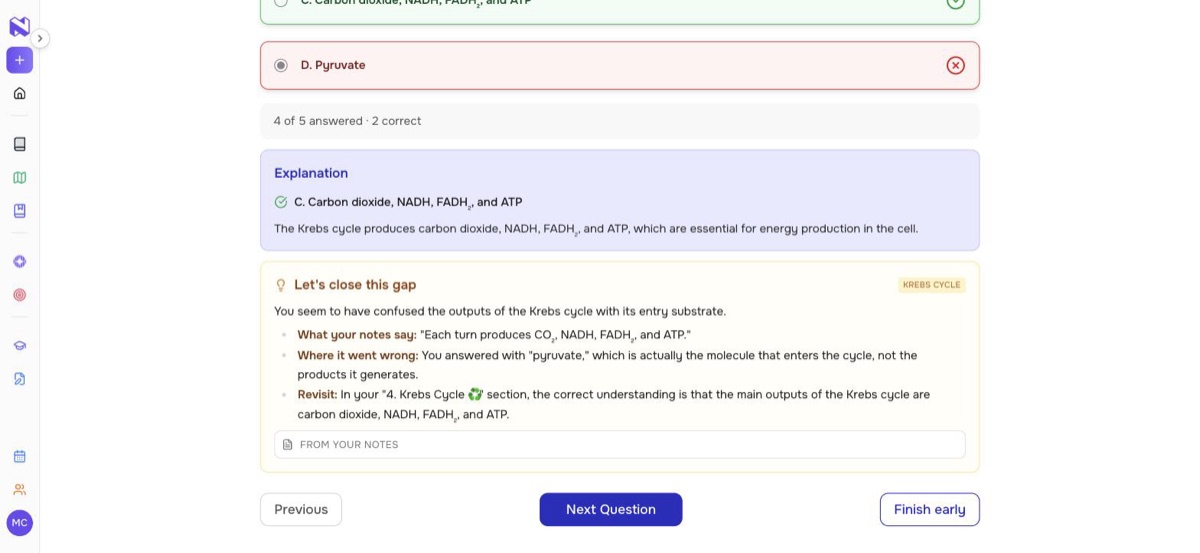
- Right after a wrong answer, open Let's close this gap. It explains what you mixed up, quotes the part of your notes that has the answer, and tells you which section to reread.
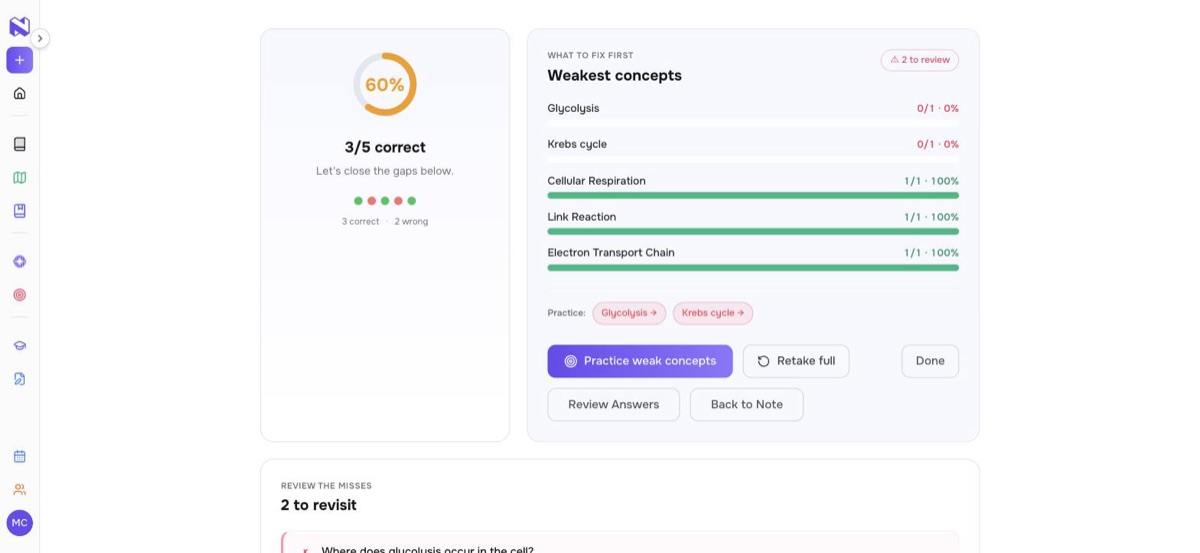
- At the end of the quiz, What to fix first lists your weakest concepts, and Practice weak concepts re-asks the questions you missed.
- Over the following days, each concept is scheduled for review. Concepts you know less well come back sooner.
A worked example: Cellular Respiration, Lecture 7
We made a 9-slide sample deck and put one detail in each hard-to-read place:
- a table (the ATP yield of each stage)
- a speaker note (a memory aid for the Krebs cycle)
- a group of text boxes (a lab result: fermentation fastest at 34°C)
- a slide that is only a diagram (a mnemonic for the link reaction)
The note. About 2,000 words in seven sections, from the respiration overview to stage locations and ATP yields. All four details made it in, each in the right section. The diagram slide became its own "Link Reaction" section.
The quiz. Five multiple-choice questions, including one on the link reaction, which appeared only in the diagram. We got two wrong on purpose: where glycolysis happens, and what the Krebs cycle produces.
What ARC did. For the Krebs cycle miss, Let's close this gap said we had confused the cycle's outputs with its starting molecule, quoted our notes ("Each turn produces CO₂, NADH, FADH₂, and ATP") and pointed back to the Krebs cycle section. The results screen put glycolysis and the Krebs cycle at the top of What to fix first. Practice weak concepts re-asked those two questions, and we got both right.
When those concepts come back:
| Concept | Mastery after the quiz | Next review |
|---|---|---|
| Glycolysis | 40% | in 3 days |
| Krebs cycle | 50% | in 3 days |
| Electron transport chain | 67% | in 7 days |
| Link reaction | 100% | in 14 days |
Frequently asked questions
Can Nuros make notes from Google Slides?
Yes. Download the presentation as a .pptx file (File > Download > Microsoft PowerPoint) and upload it to a new note.
Does Nuros read speaker notes?
Yes. Speaker notes are read along with each slide's content, so explanations your teacher kept in the notes make it into your study notes.
Can I upload old .ppt files?
Save them as .pptx first. A PDF export also works, but it usually leaves out speaker notes.
What if my slides are mostly pictures?
Slides that are only a picture, such as a diagram, are read with image recognition, up to 25 per deck. Check those sections of the note, because small or handwritten labels can be misread.
How many decks can I combine into one note?
Up to 10 files per note, 50 MB each.
Keep reading
Stop forgetting what you study. Let ARC bring back the concepts you struggle with.
Try Nuros free