Less prep. Less grading.More time to teach.
Your materials become practice and tests. Nuros grades them and shows who needs help. You approve everything.
Free during beta · Google Classroom roster · Students join free
For schools and tutoring centers — contact us about a pilot
A demo class, recorded on the live app.
From syllabus to gradebook.
Upload
Your syllabus and the files you teach from.
Plan the term
Units and test dates on the class calendar.
Assign
Notes, flashcards, quizzes and tests. Check each first.
Students practise
On the web or their phone.
Release results
When you're ready, by topic.
 Google Classroom roster
- Join code
- Invite link
- PDFs and slides
- Worksheets and photos
- Notes you already have
Nuros only reads your Classroom roster. Google Classroom is a trademark of Google LLC. Use of this trademark is subject to Google Brand Permissions.
Review and edit before you assign.
Students get nothing until you assign it.
Preview
Every material, as students see it.
Edit
Any question, answer or card.
Regenerate
A fresh quiz or deck in one click.
Print
Answer key, bubble sheet, A/B versions.
Practice or graded. You choose.
Practice checks every answer. Graded waits until you release results.
How students take it
Instant feedback on every answer. Retake as often as they like.
Question 1 of 6
Aerobic RespirationWhere in the cell does glycolysis happen?
- Cytoplasm
- Mitochondrial matrix
- Nucleus
- Ribosome
Not quite. Glycolysis happens in the cytoplasm, before anything enters the mitochondria.
Timed tests and mock exams
12 question types, from multiple choice to case studies.
Your own test
Paste or upload it. Print A and B versions.
Keys stay hidden
Answers never reach students before you release.
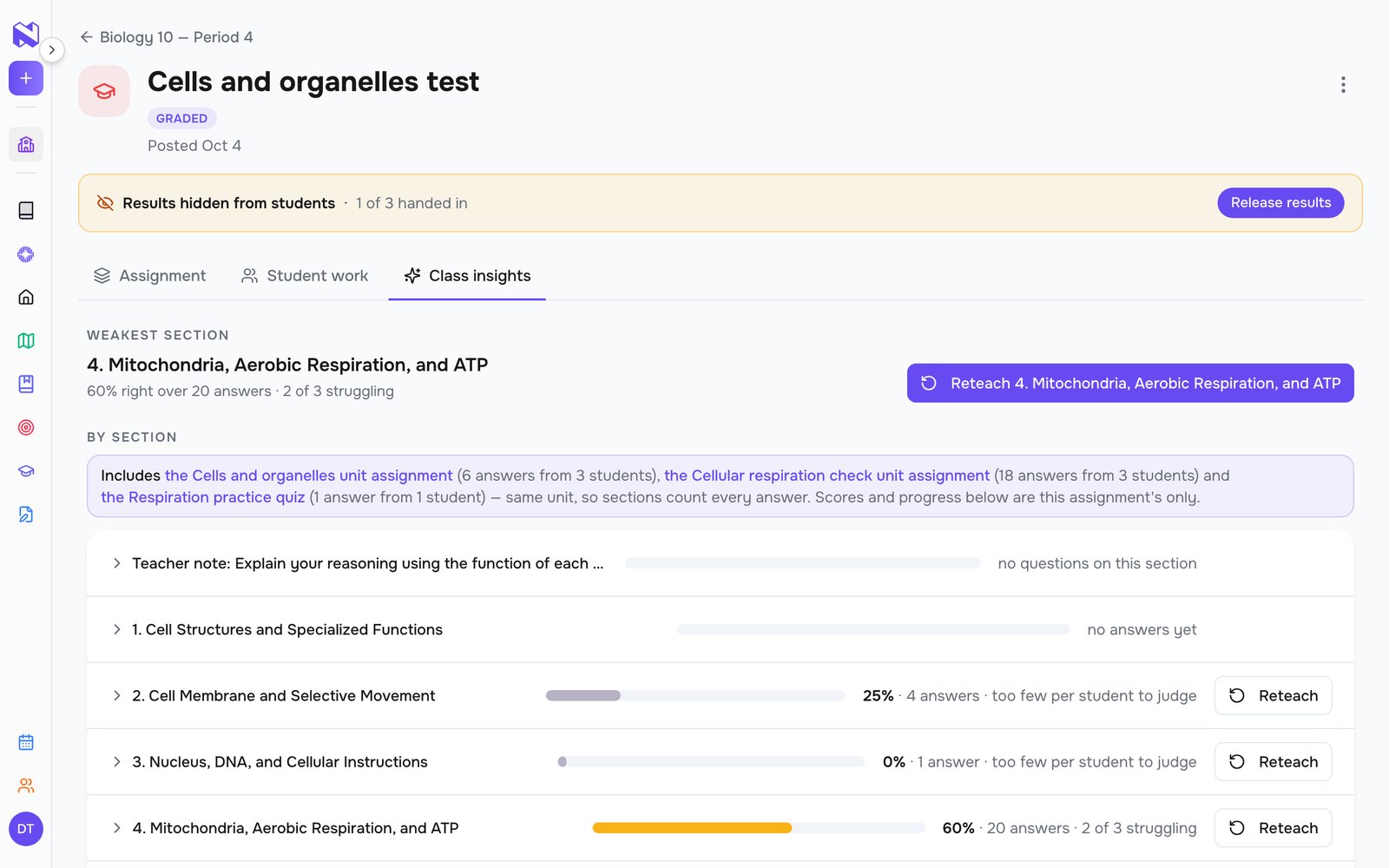
See who needs help, and on what.
Scores by student and topic. Change any mark. Reteach just the students who struggled.
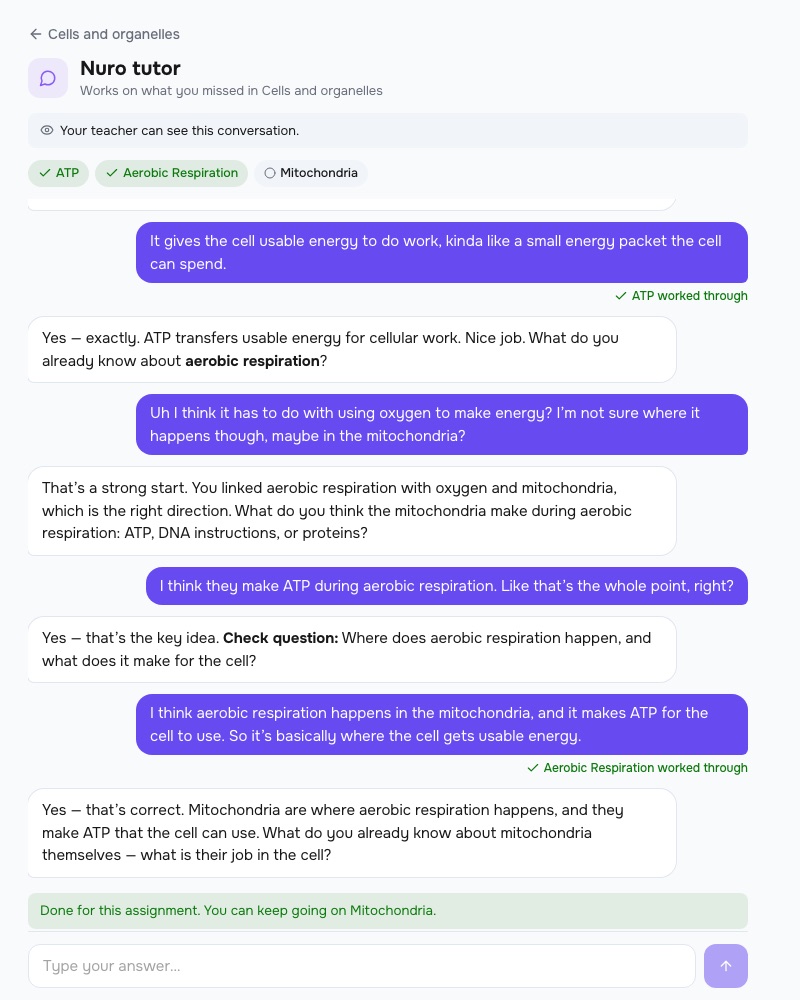
A tutor for what each student missed.
It asks before it explains. A topic counts only after a right answer.
- Two-line summaries. Per student, with the full chat a click away.
- Flags. Who asks for answers or drifts off topic. Worrying messages email you.
- Live in class. See who's stuck right now.
Students know you can see the chat. Never graded.
How Nuros compares.
| Feature |  Nuros Nuros | Flint | MagicSchool |
|---|---|---|---|
| Upload your syllabus, get the class calendar | ✓ | – | – |
| Notes, flashcards, quiz, podcast and video from one unit | ✓ | Partial | Partial |
| Timed tests | ✓ | ✓ | – |
| Hold results until you release them | ✓ | Partial | – |
| Print: answer key, bubble sheet, A/B versions | ✓ | Partial | Partial |
| Results by topic, then reteach | ✓ | Partial | Partial |
| AI tutor on each student's own misses | ✓ | Partial | – |
| Student iPhone and Android apps | ✓ | – | – |
| Google Classroom roster | ✓ | ✓ | Partial |
From each company's own website, October 2026. "–" means we couldn't find it there. Full comparison →
Frequently asked questions
Yes. Upload the syllabus PDF and Nuros lays out each unit with its test date. You check and fix it, and only when you save do the test dates go on your students' calendars.
Share a class code or an invite link and they join at nuros.app/class/join, or import the class from Google Classroom. Anything you've already assigned appears for them as soon as they're in.
Who's done, how they scored, and which section of your material is weakest, then the same figures per section, per concept and per student, against the notes you uploaded.
You choose when you assign it. Graded is handed in once, and that is the grade; results stay hidden until you release them. Practice can be retaken as often as students like, with every answer checked as they go, and the gradebook shows their best.
It records that a note, podcast or video was opened, not how much was read or watched. Written test answers are marked by AI and count. Review answers that need teacher judgment before releasing results. A quiz's written questions are practice and don't count. And it runs on the material you bring. It isn't a curriculum.
Teacher access is free during beta. The notes you upload follow the normal plans: a free account makes up to 3, Plus or Premium make more. Students only need a free account and must be 13 or older during beta, and the work you assign never counts toward their 3-note limit.
Create a free account and answer four quick questions about your school. Your classroom opens right away, with no waiting for approval.
Make your next unit easier to teach.
Free during beta.
For schools and tutoring centers — contact us about a pilot